Move a Chrome tab to a new window from the keyboard (no shortcut exists, here's what works)
Updated 5 November 2026
You want this tab on the other monitor, or next to the one you're reading, and your hands are on the keyboard. Chrome has no shortcut for it. We checked Google's shortcut list and the table in Chrome's source that maps keys to commands: there is a command to move a tab to a new window, and nothing is bound to it on Windows, Linux or Mac. Here is what Chrome does give you, the trick that looks like a move but isn't, and how to make it one action from the keyboard.
What Chrome gives you (drag, right-click menu)
Drag. Google's Manage tabs page puts it in one line: "Click and drag the tab outside the Google Chrome window." Drop it on empty desktop and it becomes a new window; drop it on another window's tab strip and it joins that window.
Right-click. Right-click a tab and you get one of two things, depending on how many windows you have open:
- With a single Chrome window: Move tab to new window.
- With more than one normal window open for the same profile: a Move tab to another window submenu listing the other windows, plus New window at the end.
Both wordings are from Chrome's current source. Incognito windows and windows from other profiles are not offered as targets; Google's page says to "make sure both windows are signed in to the same profile" before moving.
Mac menu bar. Chrome on a Mac also has Tab › Move Tab to New Window, with no key shown next to it. That matters later, because macOS can attach a key to any menu item.
The keyboard route to the menu. You can reach the right-click menu without a mouse, though it is several presses. F6 on Windows and Linux (⌘ ⌥ ↓ on a Mac) moves focus between Chrome's panes, and the tab strip is one of them. Once a tab is focused, ← and → move along the strip. Then Shift F10 or the Menu key opens that tab's menu on Windows and Linux, and Ctrl Return does on a Mac. This is how Chrome's source handles those keys; we haven't tried it on every version, so treat it as a fallback rather than a habit.
The only "move tab" keys Google lists, Ctrl Shift PgUp and PgDn, move the tab left or right inside its own window.
The address-bar trick and why it isn't a move
Some pages suggest selecting the address (Alt D or Ctrl L; ⌘ L on a Mac) and pressing Shift Enter. In Chrome's source, Shift with Enter in the address bar opens the address in a new window, though it isn't on Google's shortcut list. It is quick, and it is the wrong tool for a move.
It opens a copy. The original tab stays where it was, so you now have the page twice and have to close one. And the copy is a fresh tab: no Back history, nothing you had typed or scrolled, and a second load of the page. If you close the original, you've lost all of that. Chrome's real duplicate, right-click › Duplicate, keeps the history, but that is still a copy, not a move; the differences are in Chrome duplicate tab shortcut.
A keyboard action that moves the tab
Extensions can ask Chrome to open a new window containing an existing tab. That is a move in the full sense: the tab leaves its window with the page, your typing, its playing video and its history, exactly like dragging it out.
Disclosure: we make Tab Launcher, a free Chrome extension with a command bar that has this action. It runs on your computer only and doesn't track anything.
- Open the bar: press Alt K (⌥ K on a Mac) on the tab you want to move.
- Show the actions: press Tab while the bar is empty. The list switches to actions. Typing
/first does the same. - Run it: type
moveand press Enter. The tab opens in a new window and that window takes focus.
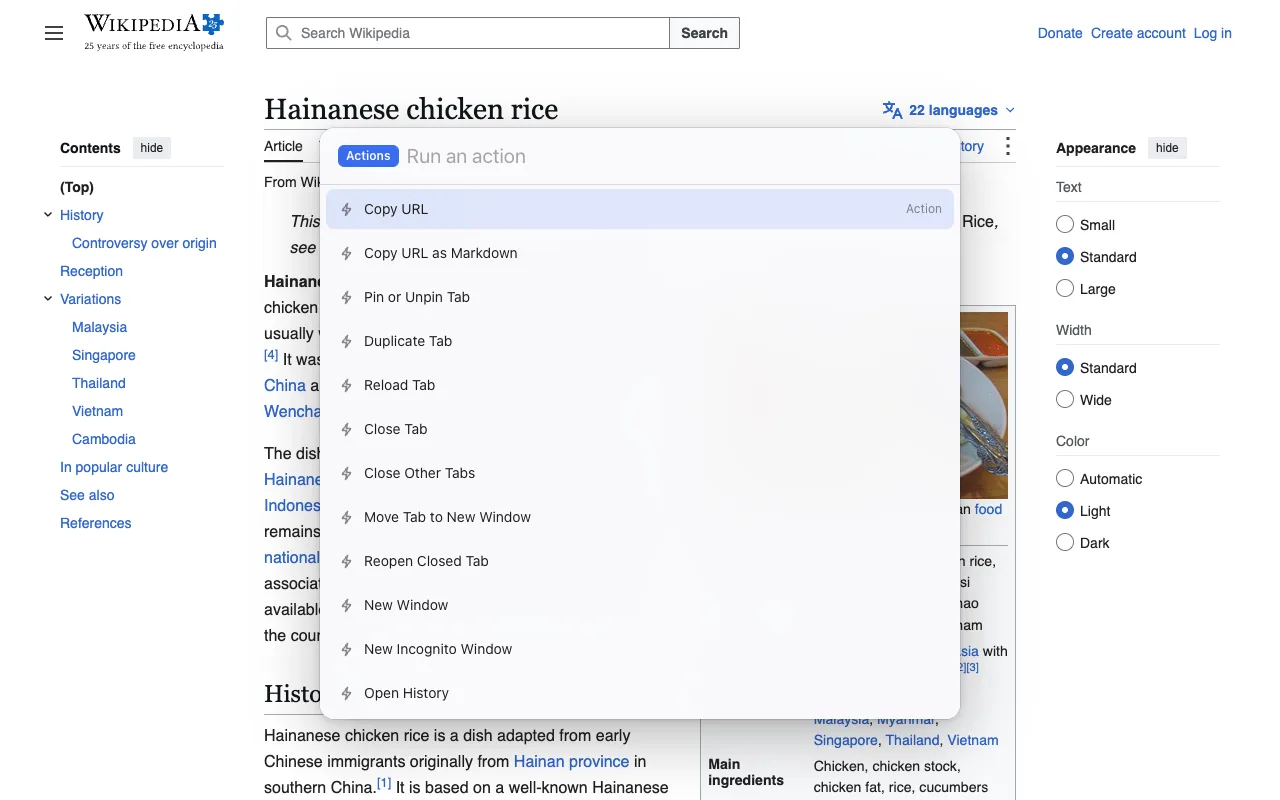
The same list has Duplicate Tab, Pin, Close Other Tabs and Reopen Closed Tab, and the bar's main job is switching: type a few letters of a tab's title and Enter goes to it, in whichever window it is. If you'd rather have the bar on a different key, it can be changed at chrome://extensions/shortcuts; the rules are in Chrome extension keyboard shortcuts.
No extension on a Mac? Use the menu item instead: System Settings › Keyboard › Keyboard Shortcuts › App Shortcuts, add one for Google Chrome, type the menu title Move Tab to New Window exactly, and press the keys you want. Apple's help page has the steps.
Move several tabs at once
Chrome moves a selection the same way it moves one tab, so the work is in selecting:
- Pick tabs: hold Ctrl (⌘ on a Mac) and click each tab you want. For a run of tabs, click the first, hold Shift and click the last. From the keyboard, with a tab focused as above, Shift ← or → extends the selection one tab at a time.
- Move them: drag any selected tab out of the window, and the rest come with it. Or right-click a selected tab: the item now reads Move tabs to new window or Move tabs to another window.
Tab Launcher's action moves one tab, the one the bar was opened on. For a batch, select with the mouse and use the menu.
Put it back (merge windows)
Chrome has no "merge all windows" command, so merging is moving in reverse. Drag the tab, or a selection, onto the other window's tab strip, or right-click › Move tab to another window and pick the window from the list. To fold an entire window into another, click its first tab, Shift-click its last, and move the lot; the empty window closes by itself.
If you closed the window by mistake, Ctrl Shift T (⌘ Shift T on a Mac) brings back the last closed tab or window, per Google's list. Finding a tab you moved and lost track of is the job of tab search, covered in how to search your open tabs in Chrome.
Edge and Brave
Neither has a key for this either, as far as we can find. Microsoft's Edge shortcut list has no row for moving a tab to a window; use the tab's right-click menu or drag. Brave lets you change its shortcuts at brave://settings/system/shortcuts, but the command list we checked has no entry for moving a tab to a new window, so there is nothing to bind there. Tab Launcher installs from the Chrome Web Store in both browsers, though we test it in Chrome.
FAQ
Is there a Chrome shortcut to move a tab to another window?
No. Google's shortcut list has only Ctrl Shift PgUp and PgDn, which move a tab left or right inside its window, and Chrome's shortcut table has no key for the move-to-new-window command on Windows, Linux or Mac. Moving between windows is a drag, a right-click menu item, or an extension action.
Why does my menu say "Move tab to new window" instead of "Move tab to another window"?
Because there is nowhere else to move it. Chrome shows the submenu only when more than one normal window is open for the same profile. With a single window it shows the plain item instead. Incognito windows and other profiles are not offered as targets.
Does moving a tab to another window reload the page?
No. Dragging, the menu item and the extension call all move the tab itself: the page keeps playing, keeps what you typed and keeps its Back history. The address-bar trick is the exception, because it opens a new copy rather than moving anything.
Can I give the move a key on a Mac without an extension?
Yes. Chrome's Mac menu bar has Tab › Move Tab to New Window, and macOS lets you attach a key to any menu item: System Settings › Keyboard › Keyboard Shortcuts › App Shortcuts, add one for Google Chrome with the menu title Move Tab to New Window typed exactly. Windows and Linux have no equivalent.