Chrome duplicate tab shortcut: the two-key trick, what it loses, and a keyboard fix that keeps history
Updated 5 November 2026
Search for a Chrome duplicate tab shortcut and you get a different answer on every page: Ctrl Shift K, ⌘ Shift D, Ctrl Shift D. None of them duplicates a tab in Chrome. We checked Google's shortcut list and Chrome's source code. Here is what Chrome actually has, the two-key trick that works on every platform, what that trick quietly loses, and how to get a duplicate from the keyboard that keeps everything.
There is no built-in shortcut
Google's Chrome keyboard shortcuts page doesn't contain the word "duplicate". Chrome's source agrees: the table that maps keys to commands has no entry for the Duplicate command on Windows, Linux or Mac. The keys other pages quote do something else, or nothing:
| Key | What it does in Chrome |
|---|---|
| Ctrl Shift K | Nothing. It's Edge's duplicate shortcut, not Chrome's. |
| Ctrl Shift D / ⌘ Shift D | Bookmarks every open tab into a new folder. |
| Ctrl D / ⌘ D | Bookmarks the current page. |
What Chrome does have is a menu item. Right-click a tab and choose Duplicate. On a Mac it's also in the menu bar, under Tab › Duplicate Tab, with no key next to it. The copy appears to the right of the original, in the same tab group, and pinned if the original was pinned.
The address-bar trick (Windows, Mac, Linux)
The nearest thing to a shortcut is two keys: select the address, then open it in a new tab. It works on every platform because both halves are on Google's list.
- Select the address: press Alt D on Windows or Linux (Ctrl L and F6 do the same), or ⌘ L on a Mac. The whole address is highlighted.
- Open it in a new tab: press Alt Enter on Windows or Linux. Google describes this key as "open a new tab and perform a Google search", but it opens whatever is in the box, an address included, in a new tab next to the current one and switches to it.
- On a Mac: press ⌘ Return. Google lists it as "open the website in a new background tab", so the copy appears next to the current tab without switching to it; press ⌘ ⌥ → to get there. In Chrome's source, ⌥ Return opens the copy in the foreground instead, the same way Alt Enter does on Windows. Google's list doesn't mention it, so if it does nothing for you, use ⌘ Return.
Two things to avoid. Ctrl Enter (and Ctrl Return on a Mac) doesn't open a tab: it adds "www." and ".com" to what you typed. And if you had started typing in the address bar, press Esc first so the box shows the page's real address again.
Why the copy has no back button
The trick isn't a duplicate. It's a brand-new tab told to load an address, so it starts with a history of one page. Press Back in it and nothing happens. Anything the original tab remembered, including the pages you came through, the Forward list, and the position you had scrolled to, stays in the original.
Right-click › Duplicate is different. In Chrome's source it clones the tab: the new tab gets a copy of the whole list of pages the original has visited, so Back and Forward work in the copy as they did in the original. That is the behaviour extensions get too, when they ask Chrome to duplicate a tab rather than opening the address in a new one. If you duplicate tabs to keep a page while you follow a link, or to compare two steps of a form, this is the version you want.
Duplicate from the keyboard with history intact
There is no key for the menu item, but a command bar can run it. Chrome's extension API has a duplicate call that does exactly what the menu does, history included.
Disclosure: we make Tab Launcher, a free Chrome extension with a command bar that has this action. It runs on your computer only and doesn't track anything.
- Open the bar: press Alt K (⌥ K on a Mac) on the page you want to copy.
- Show the actions: press Tab while the bar is empty. The list switches to actions: copy URL, pin, reload, close, duplicate, move to a new window and so on. Typing
/first does the same. - Run it: type
dupand press Enter. The copy opens next to the original, in the same group, with its Back history.
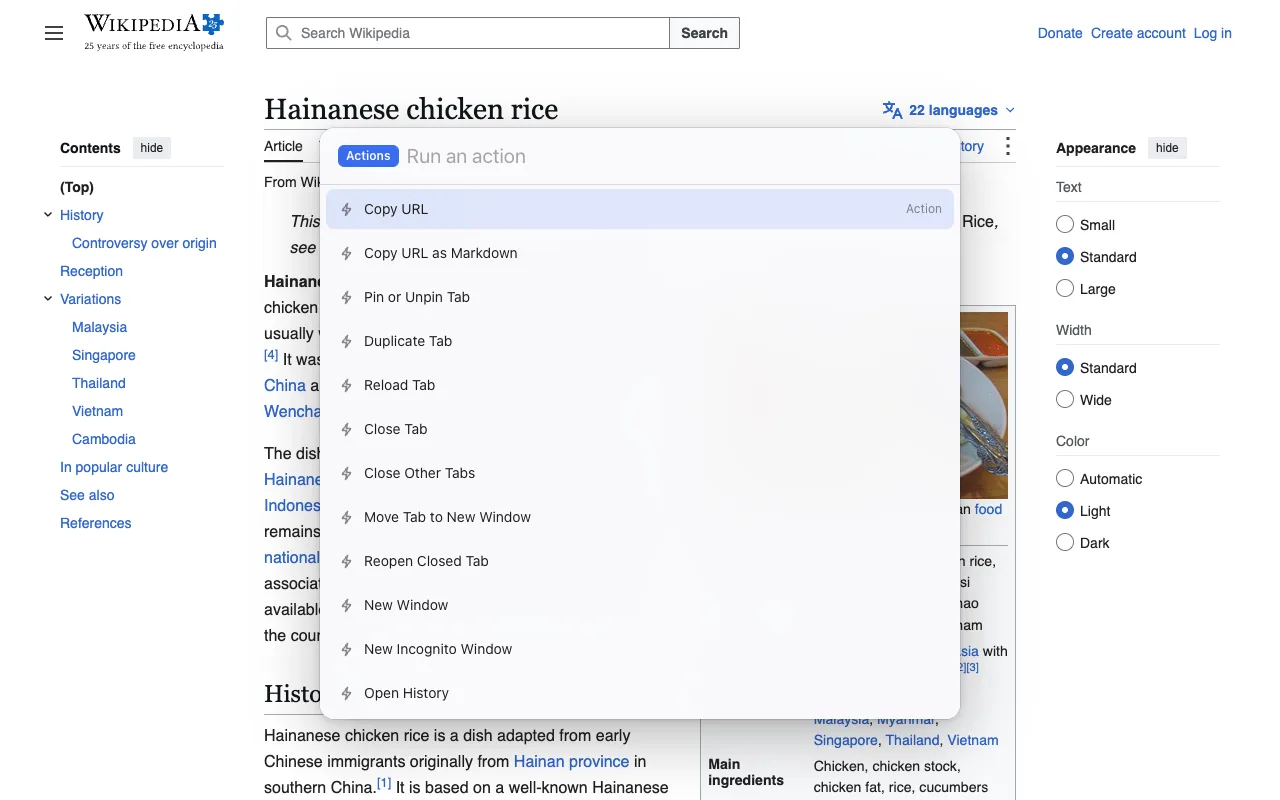
Four presses rather than two, but the copy is a real duplicate, and the same bar switches tabs, reopens the last closed one and edits the address. The bar's own shortcut can be changed at chrome://extensions/shortcuts; the rules for that page, and which keys Chrome refuses, are in Chrome extension keyboard shortcuts.
On a Mac there is also a way with no extension at all. macOS lets you give any menu item a key: System Settings › Keyboard › Keyboard Shortcuts › App Shortcuts, add one for Google Chrome, type the menu title Duplicate Tab exactly, and press the keys you want. Apple's help page has the steps. Windows and Linux have no equivalent.
Duplicate into a new window
To get the copy in its own window rather than next to the original, there are three routes:
- Address bar: Shift Enter after selecting the address opens it in a new window in Chrome's source (it isn't on Google's list). Same trade as the trick above: a fresh tab with no history.
- Menu: right-click › Duplicate, then right-click the copy › Move tab to new window. History kept.
- Command bar: run Duplicate Tab, then Alt K, Tab,
move, Enter for Move Tab to New Window. More on that action, and on moving tabs between windows generally, in move a Chrome tab to a new window from the keyboard.
One case does it in one step: in an installed web app window, which has no tab strip, Chrome's Duplicate command opens the copy in a new window by itself.
Edge and Brave
Edge is the browser the Ctrl Shift K advice comes from. Microsoft's Edge shortcut list has it as "Duplicate the current tab" on Windows; its Mac table has no duplicate row, so on a Mac use the tab's right-click menu.
Brave has no default key that we could find, but it does have something Chrome lacks: a page for changing its own shortcuts, at brave://settings/system/shortcuts (Brave's support site says its listed shortcuts can be customised under Settings › System › Shortcuts). "Duplicate tab" is one of the commands in Brave's list, so you can give it any free key there.
Tab Launcher installs from the Chrome Web Store in both browsers, though we test it in Chrome.
FAQ
Is Ctrl+Shift+K a duplicate tab shortcut?
In Microsoft Edge, yes: Microsoft's shortcut list has Ctrl Shift K as "Duplicate the current tab" on Windows. In Chrome it does nothing. Chrome's shortcut table has no entry for it, and the Duplicate command has no key at all.
Does duplicating keep the scroll position and text typed into forms?
Partly. Right-click › Duplicate copies the tab's saved page state, the same data Chrome uses to restore tabs after a restart, so the copy usually opens at the same scroll position and may bring back text in form fields. It is a snapshot, not a live copy: anything the page holds only in memory, like an unsent message in a web app, is not carried over. The address-bar trick carries nothing; it loads the page fresh.
Can I assign my own duplicate shortcut in Chrome?
Not to the built-in command on Windows or Linux: Chrome has no editor for its own shortcuts, and chrome://extensions/shortcuts only covers extension commands. On a Mac you can: System Settings › Keyboard › Keyboard Shortcuts › App Shortcuts, add one for Google Chrome with the menu title Duplicate Tab typed exactly, and the Tab menu item gets that key.
Why does the address-bar trick fail on a Mac?
Usually because the keys are different. Alt D is not a Mac shortcut; use ⌘ L to select the address. Ctrl Return adds www. and .com instead of opening a tab. ⌘ Return opens the copy in a background tab, so it looks like nothing happened until you look at the tab strip. ⌥ Return opens it in the foreground in Chrome's source, though Google's shortcut list doesn't mention it.